Amending your subscription
Upgrading Your FLG Edition
As your business grows and evolves, you may find that you need more from FLG. Upgrading your edition—or increasing your user licenses—is quick and easy.
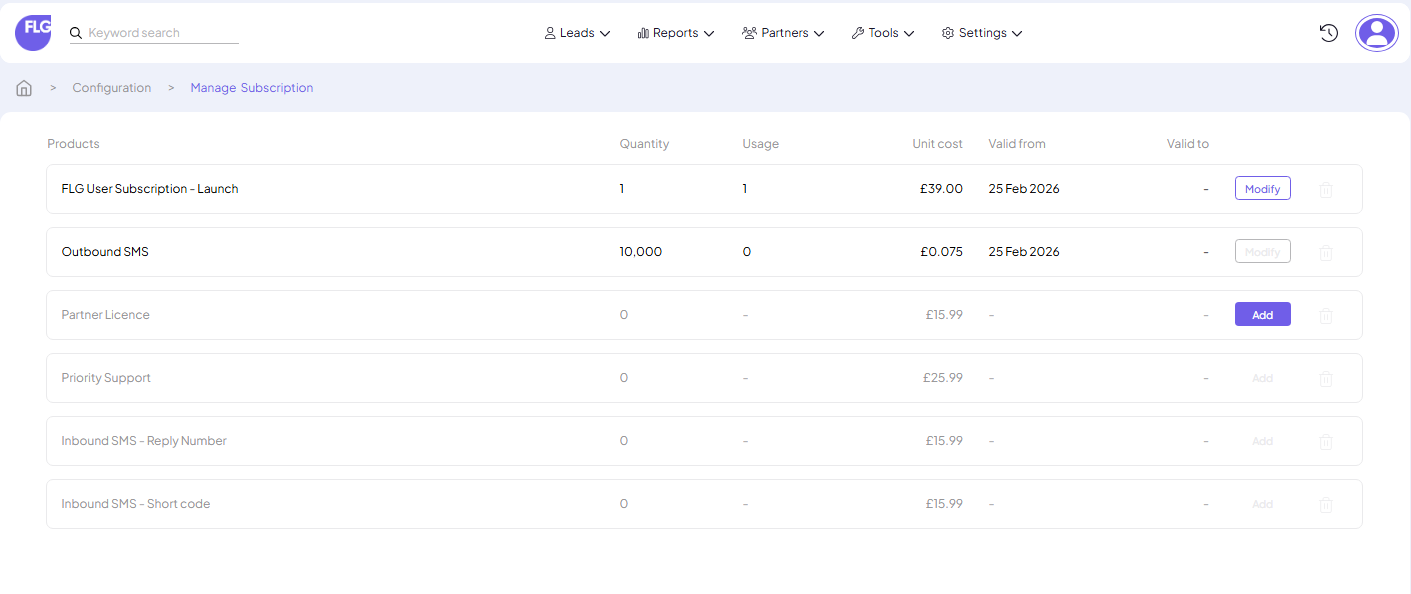
You can manage this anytime by going to Settings → Configuration → Subscription
From your Subscription page, you’ll be able to:
- Upgrade your FLG edition to access additional features
- Add more user licences to support a growing team
- Modify your existing licences as your requirements change
Important Information About Upgrades
Upgrades take effect immediately, and any additional costs are billed on a pro‑rata basis on your next subscription invoice.
Downgrading Your FLG Edition
If you wish to downgrade your edition, please contact us to discuss.
Before getting in touch, we recommend reviewing our pricing page so you understand how your feature access and inclusive allowances may change.
Once you contact us, our team will:
- Review the differences between your current edition and the one you’d like to move to
- Confirm that your account fits within the allowances and features of the lower edition
- Complete the downgrade after everything is verified
Downgrades take effect on your next billing date, and we cannot issue partial credits.
Decreasing User or Partner Licences
To reduce the number of User or Partner licences on your subscription, please reach out to us:
Phone: 01282 798 545
Email: Support@getflg.com
Contact form: getflg.com/contact
Important:
Deleting users in FLG does not reduce the number of licences you are billed for. You must request a subscription change for your licence count to be adjusted.